Six Hours, $200, and One Raspberry Pi: The Least Annoying Computer I've Ever Set Up
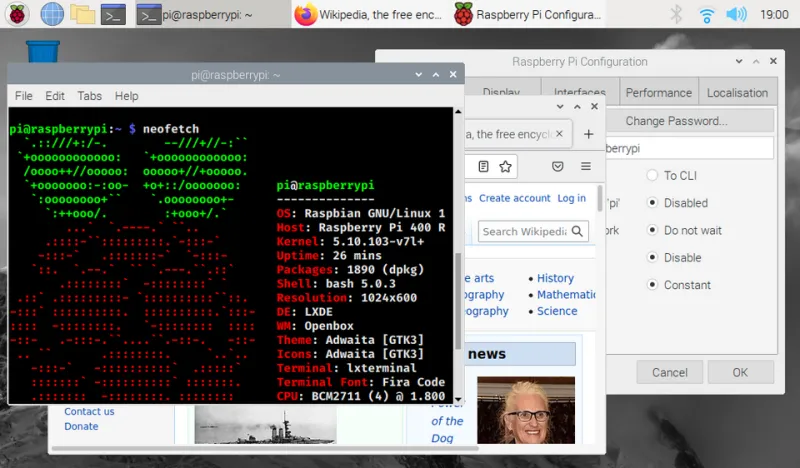
Photo: Anselm Schüler, GPL, via Wikimedia Commons
The Phone Call That Started It All
My grandpa called me in March because, quote, "the computer is yelling about a virus." It was not yelling about a virus. It was a fake McAfee popup with a toll-free number, and he had already dialed it once and hung up when the man on the line asked him to install "a safety viewer." That's the closest call you want to have.
He's 81. My grandma is 78. They live outside Cedar Rapids, and their computer — a 2014 Dell tower running Windows 10 that Microsoft had just politely threatened to cut loose — was a museum of adware, toolbars, and three different PDF readers. The whole thing had become hostile territory, and they were scared of their own desktop.
So I did what any tech blogger with a credit card and a free weekend does: I ordered a Raspberry Pi 5, a case, a power supply, and a 128GB SD card. Total damage: about $200 with shipping. Then I drove six hours to install it in person, because the one thing you cannot ship in a box is trust.
Why a $50 Computer Beats a $500 One for Seniors
Here's the uncomfortable truth I kept circling while building this thing: mainstream PCs in 2025 are still designed for people who enjoy maintaining them. The update prompts, the "let's finish setting up your device" nag screens, the Bing defaults, the popup asking if you're SURE you don't want OneDrive — every one of those is a decision an 81-year-old shouldn't have to make before checking a recipe.
A Raspberry Pi running Raspberry Pi OS flips the threat model entirely. Nobody's writing malware for ARM Linux desktops in any meaningful volume. There's no phishing-bait browser extension ecosystem. And the whole system is small enough that I could configure it top to bottom in an afternoon.
The build itself was almost boring. Pi 5 in an aluminum case with an active cooler, a 27-inch monitor they already owned, a wireless keyboard and mouse. The Pi boots into a clean, uncluttered desktop that looks like what Windows advertises in the commercials.
The Grandma-Proofing Checklist
This is the part worth stealing, whether you use a Pi or not. My requirements:
Auto-updates that actually update. I enabled unattended-upgrades for security patches and set the Pi to reboot at 3 AM if needed. No dialogs, no restart-now buttons, no red badges. Updates happen like sunrise.
Kiosk-adjacent browsing. Firefox is the only browser, with uBlock Origin pre-installed and the homepage set to their church's site. No Chrome profiles, no "set as default" prompts, no extension store to wander into. I disabled the ability to install add-ons entirely.
Remote admin via Tailscale. This is the magic ingredient. The Pi runs Tailscale, so when grandpa calls me in July because "the email looks funny," I can SSH in from my couch in Chicago and actually see the problem. No more "okay now click the bottom-left button — no, the OTHER bottom." I also set up a read-only dashboard so I can check that the machine is alive and patched without bugging them.
Backups nobody notices. Their documents folder (photos of the great-grandkids, mostly) syncs nightly to a Synology NAS at my parents' house via Syncthing. If the SD card dies, we lose nothing but the card.
One instruction card. Taped to the bottom of the monitor: a laminated 4x6 card with exactly three instructions. How to turn it on. How to open email. My phone number. That's it. Anything requiring a fourth instruction is a design failure on my end, not theirs.
The Drive Out There
I want to be honest about the six-hour drive, because it's the part of this story that no YouTube tutorial covers. I could have mailed the Pi pre-configured. I didn't, because the setup's real feature isn't the software — it's that when grandma asked me a question, I answered it in person, and she wrote the answer on the back of the instruction card in her own handwriting.
We spent the first hour just deleting stuff off the old Dell together while she narrated its history like a crime scene. "That one's from when I clicked on the garden catalog." The new machine went next to it, and we migrated exactly four things: email, bookmarks, two folders of photos, and the recipe she keeps in a Google Doc because my cousin set it up in 2021.
Grandpa's verdict, after a week: "It's faster than the other one and it doesn't yell." That's a five-star review from the toughest demographic in computing.
What This Says About the Rest of Us
Here's my broader complaint, and it's the reason I'm writing this up instead of just fixing my family's problems quietly: the fact that a $200 single-board computer is the less hostile option for older Americans is an indictment of the whole industry. Microsoft, Apple, and every PC maker in between treat seniors as an upsell opportunity — remote support subscriptions, extended warranties, "tech coach" services — rather than designing for the actual use case, which is email, photos, a browser, and peace of mind.
There's a real product hiding in what I built in my basement. A hardened, auto-updating, remotely-manageable desktop for people who never asked to become sysadmins of their own lives. Until someone ships it, the DIY route works, and it works well.
Total cost: roughly $200 in parts, one tank of gas, and a laminated card. Total support calls since installation: one, resolved in nine minutes over Tailscale. My grandparents got their independence back, and I got my evenings back.
If you've got aging parents or grandparents staring down the Windows 10 end-of-support cliff this year, I'd genuinely look at this before buying them another tower they'll be afraid of. The hardware is cheap, the software is free, and the only thing you can't automate is showing up once to tape the instructions on yourself.