I Treated My Apartment Like a Fortune 500 for 30 Days: The Home Network Segmentation Experiment
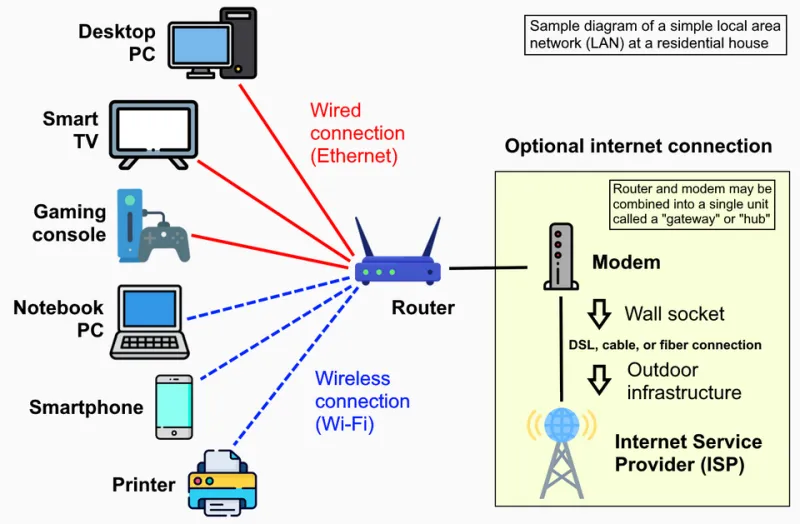
Photo: Own work, CC0, via Wikimedia Commons
Every smart gadget in my apartment — the doorbell, the TV, the bulbs, the fridge that connects to Wi-Fi for reasons I still don't fully understand — was sitting on the same network as my laptop, my work machine, and the external drive with my tax returns on it. That's the equivalent of a company putting the intern's laptop, the server room, and the front door all on one flat network. Nobody would do that on purpose. I did it by accident for years.
So for one month, I ran my home network like an IT department would: segmented, monitored, and locked down with free open-source tooling. Here's the honest scorecard.
The Setup: Cheap Hardware, Free Software
You don't need enterprise gear for this. My total spend was about $180:
- A used mini PC ($90 on eBay) to run OPNsense, a free, open-source firewall and router OS
- A cheap managed switch with VLAN support ($45)
- My existing Wi-Fi router, demoted to access-point duty
If OPNsense sounds intimidating, it's less scary than it looks. The install took twenty minutes, and the web interface is genuinely usable. There's a learning curve, sure — I spent one evening Googling what a NAT rule was for the fourth time — but the documentation is solid and the community forums answer questions faster than my ISP's support line answers the phone.
The Segmentation Plan
I split the apartment into four zones:
- Trusted — laptops, phones, the NAS
- IoT — everything with an app and a light on it
- Guest — visitors, obviously
- Quarantine — new devices before I vet them
The IoT VLAN is the star of the show. Devices there can talk to the internet but can't see anything on the trusted network. If my smart plug gets compromised tomorrow, the attacker has a smart plug. Not my photo library.
The one headache: some IoT ecosystems (looking at you, certain smart TV apps) want to discover devices via broadcast traffic across the network. There are ways to allow just enough of that with mDNS reflectors in OPNsense, but expect to spend an afternoon on it. This is the part of the article where I admit I cast my TV to the wrong VLAN for three days.
What the Traffic Monitoring Actually Revealed
OPNsense ships with traffic analysis, and this is where the experiment got interesting. A few findings:
- The fridge phones home constantly. My refrigerator made outbound connections to three different analytics domains. It's a fridge. What is it analyzing? My leftovers?
- One smart bulb reached out to a server in a country I can't pronounce the region of. It's now firewalled to a allowlist-only policy. The bulb still works. Turns out the cloud connection was optional all along.
- My TV consumed more bandwidth than my work laptop. Ad tracking on smart TVs is aggressive and unapologetic.
None of this is a breach. But seeing it laid out in a dashboard changes how you think about the gadgets you invite into your home. It's the difference between reading about data collection and watching it happen in real time.
The Scorecard: What Worked, What Didn't
Wins:
- Guest network with a captive portal — visitors get internet, nothing else. My in-laws noticed nothing, which is the highest compliment.
- Quarantine VLAN for new devices. Every new gadget now earns network access. Most pass. Some don't.
- Real visibility. I can answer "what is this device doing?" with data instead of vibes.
Losses:
- Streaming got fussy. Chromecast and some casting protocols hate VLANs by default. Solvable, but annoying.
- Printer setup was a saga. Printers are their own category of punishment.
- My partner asked why the Wi-Fi "changed." It didn't, but perceived downtime during config mistakes counts in every household.
Should You Do This?
If you own zero smart devices and your router came from your ISP, skip this. If you own more than five connected gadgets — and most US households do — some version of this is worth it, even a scaled-down one. Many mesh systems now offer basic IoT network isolation in their apps without any Linux required. It's not as thorough, but it's a 80/20 solution that takes an evening instead of a weekend.
The full setup is for people who enjoy this stuff. The mindset is for everyone: your gadgets are houseguests, and some of them gossip. Decide who gets to talk to whom.
The fridge has calmed down, mostly. It still phones home, but now it does so on a network where nobody's listening — except me.